Ten-Tec Omni-D Repair
At the end of the school year, I learned the emergency operations center at UC Davis has a radio room meant for amatuer radio operators that had gone unused after the pandemic. One of the most valuable commodities at a university is space and here was an empty room whose sole purpose was for ham radio. My dreams of having a club station were looking more realistic so I started looking for equipment over the summer.
Robert (KI6AHX), a ham from my local club, was giving away some older equipment so I asked for a power meter and some handhelds. When going to pick them up, he asked about my club and our plans. Seeing that we were legitimate, he went back inside and came out with a massive object– the Ten-Tec Omni D.
This self-described “portable station” is a bulky 15 lb radio produced in the 1970s by Ten-Tec. Though old, they are reliable rigs and still highly praised today. I haven’t had much experience with HF radios of this age, so I was super excited our club was getting one. I tested it out the day after I got it and I think you’re able to make an educated guess about what happened next.
PTO Not Working
Technically, the radio worked. It worked on a single frequency for each band. The frequency dial, or permeability tuned oscillator (PTO) knob, freely rotated but was not affecting either the frequency display or the signals heard. A quick search shows this is a common problem among this series of radios. Ten-Tec not only overgreased their mechanisms to avoid warranty claims, but the kind of grease they used hardens after a few decades. For this radio, it had been over half a century.
Since this grease issue is present in all Omnis, there are plenty of walkthroughs on how to fix the problem. I followed this video and while the radio is different, the PTO box is the same. The basic steps are removing the PTO box, cleaning out all the hardened grease, and adding new grease.
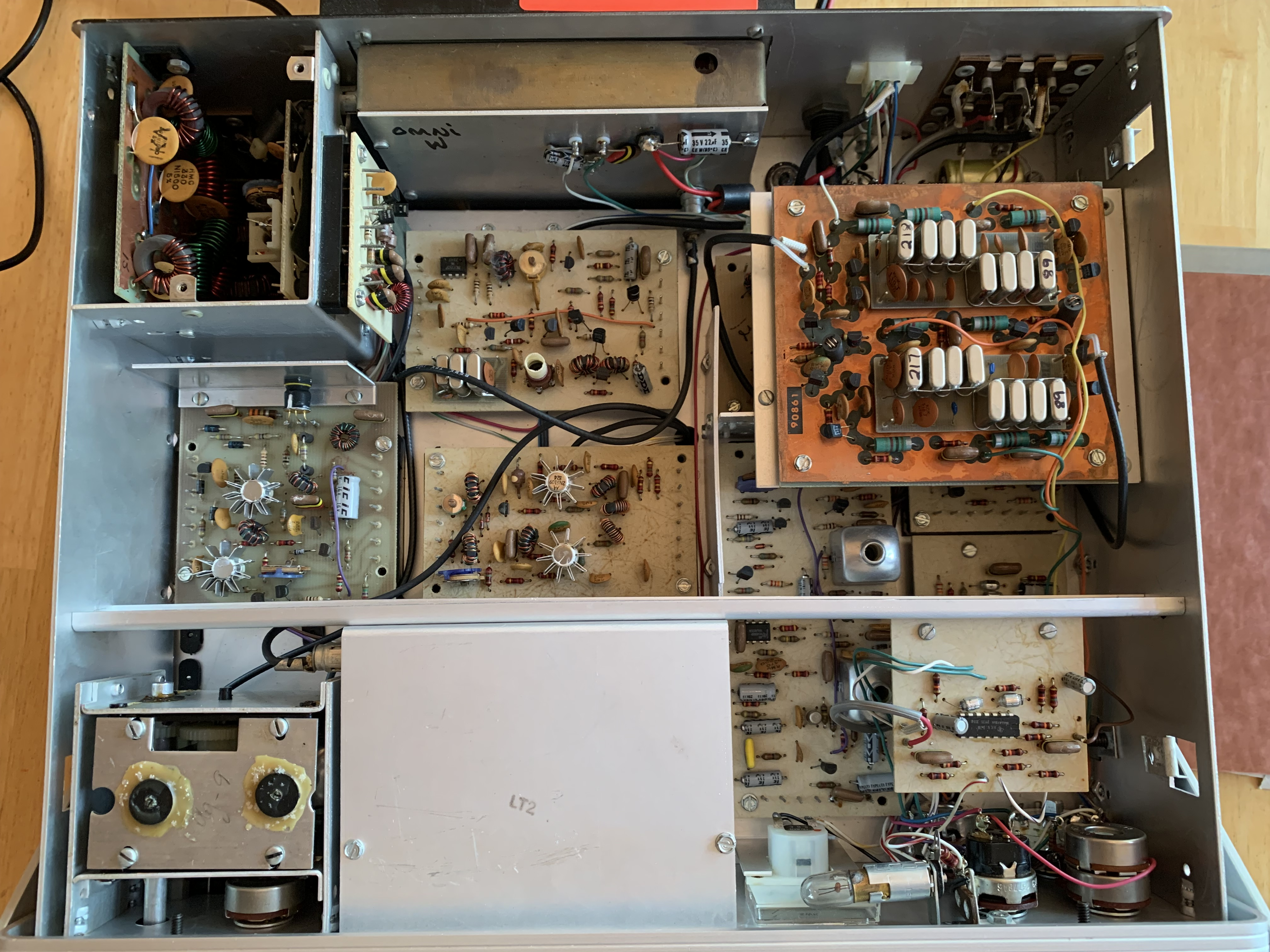
The manual was a great help during this process. The diagrams are super clear and the manual even has instructions on disassembling the PTO box for cleaning. There was no real barriers during this process, except for maybe strength. The axel is supposed to be pushed through the box to remove a pin, but the grease was so hard, I couldn’t do it with my strength. I borrowed someone else’s strength to budge it enough to continue working.
Once all the parts were out, the cleaning began. Q-tips and isopropyl alcohol are the way to go, but it still takes quite a while. I ended up soaking some of the parts overnight to help loosen the grease. Once I got as much out as I could, it was time for the next grease. SuperLube was the recommended product. It’s synthetic so it shouldn’t have the same hardening problems as the original grease. I wasn’t sure how much to put on, so I put as much as I had taken off, though it seemed overgreased. At least it wouldn’t cause problems if it is.
After the PTO was reassembled, it was time to test. And . . . it worked! I could now switch frequencies! I also got more confirmation that the receiver worked because I was able to hear people talking as opposed to noise. Now I needed to see if they could hear me.
Testing
I didn’t own a microphone that could connect to the radio, but Robert had also given me some old mics I wasn’t as attached to. I chopped the end off a Schure 104B microphone and added the right connector to it. It seems the connector it had was not the original either as I had to cut through layers of liquid electrical tape. I didn’t have any on hand to replace it with, so the connection is sensitive. In the future, I plan to relieve tension by attaching twine to it and sealing the connection in a box.
That wasn’t necessary for testing, so I moved on. I followed the quick startup guide in the manual, using the ALC light to set the drive to the optimum place. I went to a clear frequency and held down the PTT button. I stopped hearing static and a red light lit up, confirming I was transmitting. My father went to his HF radio and listened as I did a few tests. My voice came in loud, but there was a strange hum that accompanied my signal. I adjusted the drive up and down and the hum adjusted the same amount as my voice.
The receiving HF rig was quite close, so we thought it might be interference. He took a shortwave radio and walked down the street to see if the hum was still there. While he was out, I noticed something strange. The transmitting light started to flicker during some of my transmissions. It almost looked like it followed the peaks of my voice, but when I stayed silent, it still flickered. I stopped transmitting, but when I sent another test the light was fully on.
I waited until my father was back so he could see the flickering. He came over and I pressed the button, but there was no more flickering. It didn’t light up at all. It wasn’t clear if the bulb was bad or if I was no longer transmitting. The light was the same one I used to adjust the drive, but it no longer turned on then either. I was hoping the LED had just burnt out, but if that part had blown, I might have been damaging vital parts inside.
I did some research and learned the light was not quite what I thought it had been. It wasn’t to indicate transmitting, it was an ALC light. It was supposed to fluctuate in brightness along with your voice, so it had been malfunctioning from the start when it was fully on. Continuing to use it when it was broken had likely damaged it or another component further and now it was completely off.
One thought was the SWR had gotten too high, so the ALC light kicked in. The reason why it had been on initially and off later could have been because the antenna heated up and raised the SWR. It’s a 200 watt radio while the antenna I was using only went up to 100. I decided to let it cool down and hope it would be better later on.
I tested it again a few hours later and the other radio in the house heard me, though the ALC light was still off. I didn’t trust the SWR meter on the radio, so I hooked up an external one I had also gotten from Robert. SWR was low so I moved on to power, which the meter also measured. That was where more of the problem revealed itself. I was only transmitting at two watts. Now that the ALC light was out, I wasn’t sure where to set the drive, but even going through the full range and on different bands, the highest power output I got was five watts.
Radio Not Working
It technically still works, but a QRP rig is not what I’m after. With this new information, a likely culprit arose– the low-level driver. This board is responsible for amplifying the power and is durectly connected to the ALC light. If something had malfunctioned on the board, it could explain the two symptoms I was seeing.
The manual came in handy once again with its great documentation. There are lists of what voltages each part o the board should have, so I went through checking those. The results were normal, so I moved on to the next board. The manual organizes each board in the order the signal goes through which makes it super easy to move on to the next suspect. Everything was coming back fine. Some of the values were a little lower than expected which turned out to be the power supply giving half a volt less than it should have. That shouldn’t be the problem because the current meter on the power supply hardly changes when transmitting.
While the radio was open, I decided to test the drive. At the lowest setting, the low-level driver’s output was only giving a few millivolts. As I increased the drive, the output continued to increase and got up to 20 volts. This seemed a suitable range, so suspicion moved to where that power was being sent, the finals. The measurements taken from the low-level driver did not line up with the low power I was measuring, so something was sucking that power away. The main circuit between the low-level driver and the output is the final amplifier.
There are two sets of two transistors in the final. If each pair was not behaving evenly, it could explain the loss in power. It really seemed like the finals, but I was hesitant to start poking around them because of their location. The board is directly mounted to the heat sink and the screws to remove the heat sink were in hard to reach areas.
I really wanted this radio to work (at more than 5 watts) so I caved in and got to work taking the heat sink off. It wasn’t as bad as I thought it might be, though it involved an exceptionally short screwdriver and some pliers.
Finals
I wonder if the reason they made the finals hard to remove is because they don’t want anyone to see their sloppy soldering job. There’s pools of solder everywhere. It looks like a mess to get anything out of that box. There was nothing visibly damaged, so I started to set up some tests. The amplifier should function seperate from the radio with a suitable input and output. I hooked it up to a dummy load for the output and used a power supply and signal generator for the inputs, checking the manual for the right values.
I don’t have infinte equipment, so at this part I had to get resourceful. One signal coming from the power supply powers two pins while another power one. The function generator gives a sign wave as the noise carrier. There needs to be some voltage going into a fifth pin to let the amplifier know its transmitting. For that, I used a square wave so I can compare when it is on and off. I also had to connect the ground of the amplifier to the signal generator and power supply. Of course, I didn’t have all the right cables and connectors for this so I had to make a few. After I introduced the oscilliscope, it looked like this.
I went through each component, checking the oscilliscope. Both sides looked even until the first transformer at which point the left side barely has a signal. This narrows the problem down to one quadrant. It could be the transistor, capacitor, inductor, or one of the resistors.
I couldn’t think of more ways to test the components while in the circuit because one bad component messes with the readings of the others. If I removed them individually, I could use an octopus tester to see which one is bad, but that’s if I can remove the components. The finals are messy and there are screws holding the board to the heat sink everywhere, some of which seem to be soldered in. It seems challenging to heat all that solder up enough to remove anything, but that seems to be the next step.
I’m heading back to college soon and decided not to take the Omni-D with me for space reasons. I have a few months to think of a strategy for testing it. I’m hopeful there’s some way I can deduce which part is the problem without removing them and talking to more experienced electrical engineers here seems like the way to find out. In the meantime, I’ll be working to secure the space for the Omni-D and hopefully it can make its grand appearance in the winter quarter.